Features
See it. Hear it. Read it clearly.
Handwrite turns printed pages and handwritten notes into text you can hear, translate and keep, on iPhone and iPad.
the real app
See Handwrite on iPhone and iPad
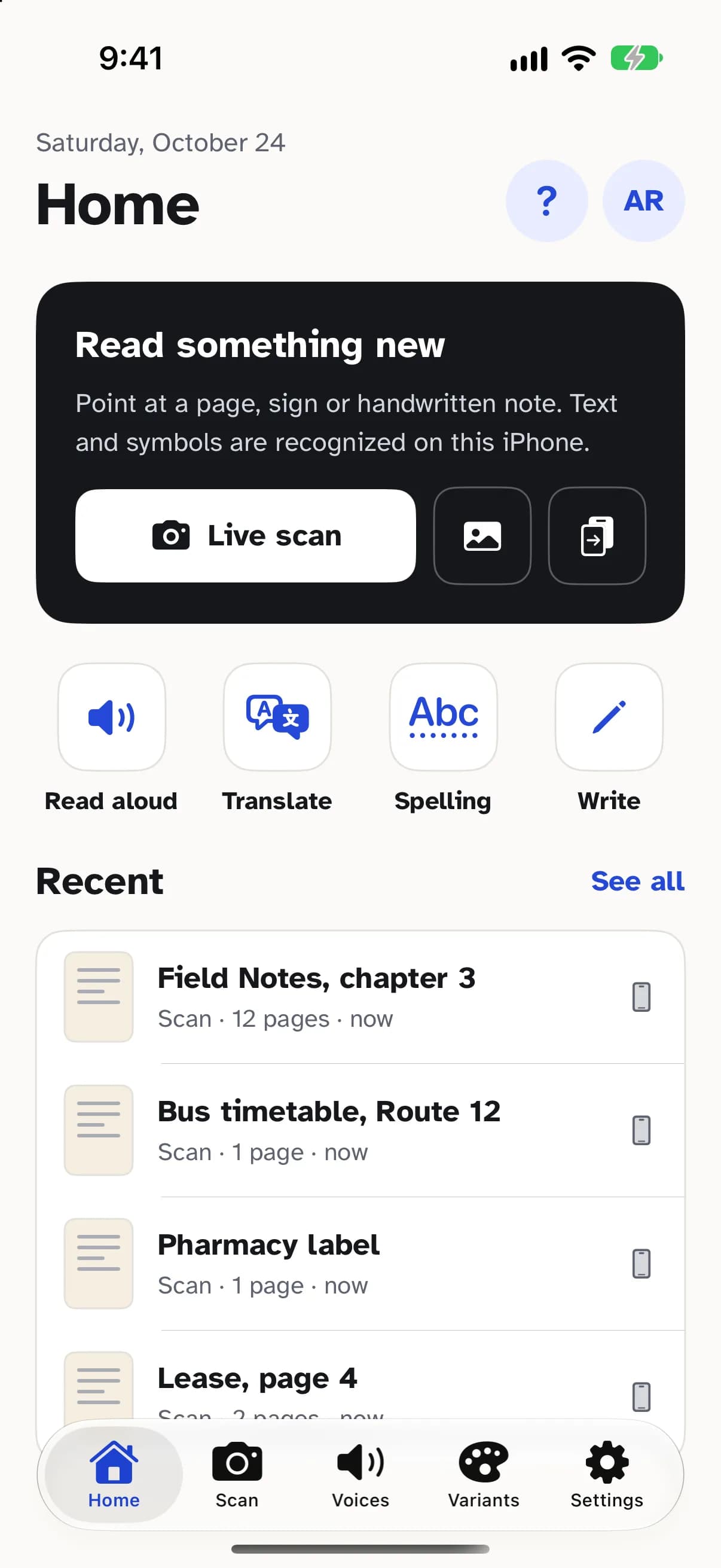
Scan
Scan print and handwriting
Point your camera at a page, a sign or a handwritten note. Live text boxes show what Handwrite has found before you tap.
- Live text boxes track each line as you aim, so you know the page is in frame.
- Camera modes for every job: Listen reads signs and labels aloud as you point, Translate covers each line with its translation, Find lights up a word, Spell underlines misspellings, and Document scans several pages in a row.
- Finds the page, straightens it and evens out the light, then reads neat print and everyday handwriting.
- Import photos, PDFs, text, RTF and Word files, links and web pages, or send them in from the Share sheet and Handwrite's Safari extension.
- Recognition runs on your device, in the languages your iPhone or iPad supports, so your pages stay with you.
Listen
Read aloud, word by word
Hear any page in a voice you like while a soft highlight follows along, word by word.
- A marker follows each word as it is spoken, so your eyes and ears stay together.
- Free, unlimited voices built into iOS, your own Personal Voice, or natural Speechify cloud voices in many languages and accents when you turn them on.
- Skip by sentence, paragraph or heading, set the speed and pitch, add pauses, and give headings and quotes their own voice.
- Fix how a name is said once, and Handwrite says it your way from then on.
- A sleep timer, spatial audio with headphones, and Lock Screen controls so you can keep listening with the screen off.
- Save any document as an audio file to listen to anywhere.
Translate
Translate what you scan
Turn a note, sign or menu into your language, then hear the translation read aloud.
- Translate a whole document in the reader, and switch back to the original in a tap.
- Point the camera in Translate mode to see each line translated in place.
- Translation runs on your device with Apple's Translation. Download languages once to translate offline.
- Read the translation aloud in a voice for that language.
Spelling
Spelling that learns your hand
Handwrite knows the usual misreads, like “rn” for “m”, and learns the words you write most.
- Fixes common misreads in new scans, like “rn” read as “m” or “1” read as “l”, only when the result is clearly a word. Turn it off whenever you like.
- Learns from the words you add and the corrections you accept, so names and favourite words stick. Review or clear them in Learned words.
- Write your own documents with on-device spelling and grammar checks in English, Spanish, French, German, Italian and Portuguese, and Apple Pencil on iPad.
- Where Apple Intelligence is available, it can explain a suggestion or polish a paragraph. Nothing changes until you accept it.
Library
Your library on every device
Every scan is saved to your library and syncs through your own iCloud Drive between iPhone and iPad.
- Scans, imports and your writing live in one library you can search by the words inside.
- Documents sync through your own iCloud Drive, and your settings and pronunciations follow you to your other devices.
- Pick up on your iPad where you stopped on your iPhone.
- Keep every document downloaded to read offline, and choose which version to keep if one was edited on two devices.
- Lock Handwrite with Face ID, Touch ID or your passcode to keep your documents private.
Everywhere
Widgets, Live Activities and Siri
Control reading from the Home Screen, Lock Screen or your voice.
- Home Screen and Lock Screen widgets: Continue reading, Now playing, Recent documents, Reading stats, Word of the day, Quick scan and iCloud sync.
- A Live Activity on the Lock Screen and Dynamic Island shows the sentence being read, with play, pause and skip.
- Ask Siri to “read my last document in Handwrite”, or build it into a Shortcut. Find documents in Spotlight.
- Control Center buttons to scan, point and listen, or play and pause without opening the app.
Accessibility
Made to be easy to read
Atkinson Hyperlegible type, big buttons and 50 reading palettes, from calm paper to high contrast.
- Atkinson Hyperlegible by default, with 50 reading fonts including dyslexia-friendly ones like OpenDyslexic and Lexend.
- 50 palettes: everyday, high contrast, colour-vision safe, low light, tinted and calm.
- Make the text as big as you need. Turn on Extra-large buttons for bigger tap areas everywhere.
- Every button is labelled for VoiceOver, and menus follow your device's text size.
- Respects Reduce Motion, with an optional haptic tap at each new sentence.
Try it on your next page.
Free to download, with 2,000 natural-voice characters a month. Already have an account? Listen in your browser.